
Agentic Screen Recording by Velo
Velo goes beyond capturing pixels. Here's how its agentic production crew, built from five specialised agents, automatically turns a rough screen recording into a polished, narrated product demo.
For most of the history of screen recording, it was mostly capturing pixels. Screen recording began as a simple utility: a way to visually document what was happening on a screen.
Early tools focused purely on recording pixels and mouse movements, creating linear videos that required human interpretation afterward. Whether it was debugging software, creating tutorials, or sharing workflows, the value came not from the recording itself, but from the time someone spent watching, understanding, and extracting meaning from it.
As software became more complex and workflows moved faster, screen recording evolved. We saw the rise of lightweight recorders, instant sharing, annotations, and async video communication. Screen recordings became easier to create and distribute.
But now, the pace of building has fundamentally changed. Teams today ship faster than ever, powered by AI tools that compress days of work into hours. Features move quickly, interfaces change frequently, and demos need to keep up with that velocity. The bottleneck is no longer building, it’s explaining what was built.
Creating a good screen recording still takes time. You write a script, plan the walkthrough, record the voiceover, redo takes when something goes wrong, and often spend additional time editing the final video. Even for short demos, the process can be surprisingly time-consuming.
Question: Instead of manually creating demos, what if a browser agent could do it for you? Capture your workflow, understand the context, generate a structured walkthrough, and produce a polished demo — all while you move on to more productive work.
That’s exactly what Velo is built for.
Velo is an agentic screen recording tool that goes beyond capturing pixels. It observes your workflow, understands what you're demonstrating, and automatically turns it into a clear, structured demo. No scripting, no retakes, no manual editing. Just record once, and let the agent handle the rest.
Velo is the world’s first agentic screen capture based video generation tool. It captures intent and knows your product, so that browser agents could themselves build product awareness and knowledge management workflows. The first step towards that is being able to make a demo.
As teams ship faster, demos should keep up. Velo helps you create high-quality product walkthroughs at the same speed you build, so you can spend less time recording and more time shipping.
How Velo's agentic screen recording crew works
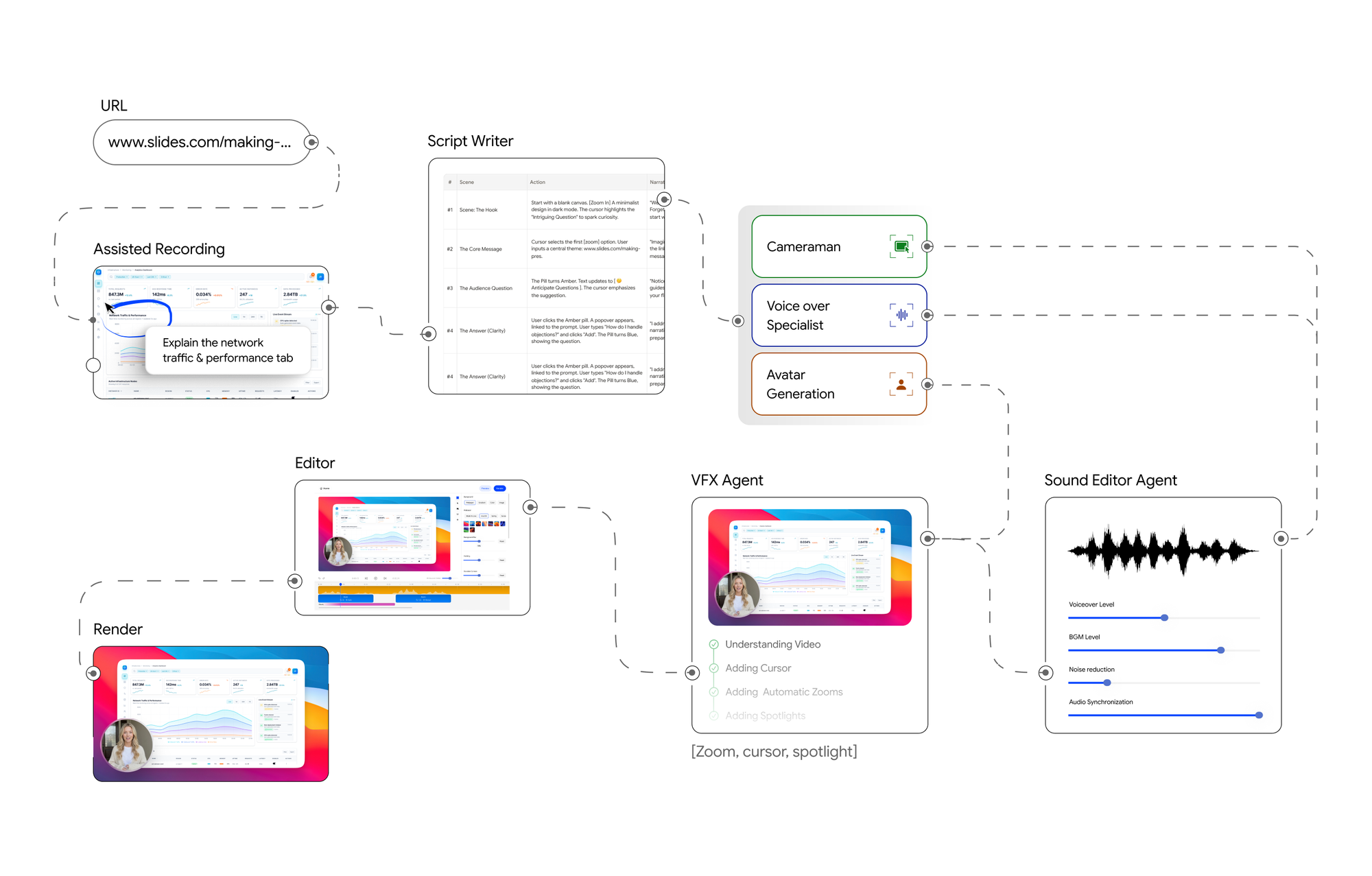
Velo’s production stack has five core systems: a script writer, a Cameraman, a voice over specialist, a sound editor agent and a VFX agent.
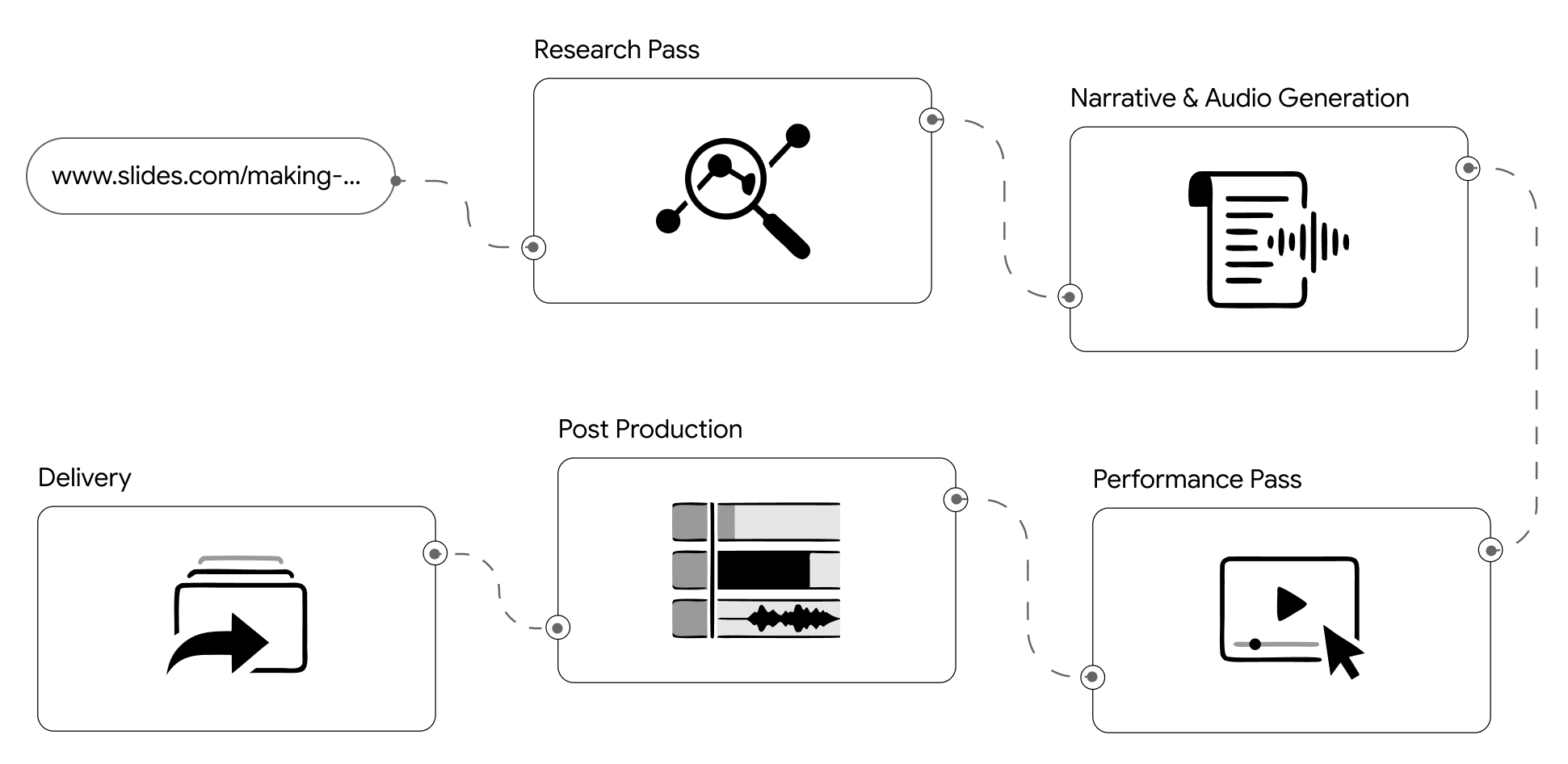
We didn’t go to film school but we built a production crew in software. This diagram illustrates a Velo production pipeline.
Here is what these blocks do:
- Assisted Recording captures the raw screen session from the URL provided by the user. This goes into a Script Writer that generates a narrative or voiceover script from the recorded actions.
- The script is handed to the The Cameraman, which orchestrates the browser sessions as a clean video. This agent uses Avatar Generation module for rendering photorealistic twin and a Voice Over Specialist for the narration and walkthrough.
- The resulting video goes into post-production, starting with the Sound Editor Agent, which synchronises audio and mixes the voiceover with browser session into one seamless video.
- Next, the VFX Agent applies visual effects like zoom, realistic cursor movements, and spotlights to draw viewer attention to the right parts of the screen.
- At this point, the user has an optional "User chooses to edit" loop, they can review and make manual adjustments via an Editor before the final Render step produces the finished video.
Why we chose assisted recording and not an autonomous exploration
Let’s address the elephant in the room. One of the most common questions we get is: why does Velo rely on assisted recording? Why not let the agent explore the product autonomously?
It’s a fair question. In theory, autonomous exploration sounds ideal — give an agent access to your product and let it figure everything out on its own. In practice, this approach quickly runs into real-world complexity.
Agents are bad at blind product exploration. Modern products are too dynamic, too stateful, sometime complex and too inconsistent across runs for brute-force navigation to be reliable.
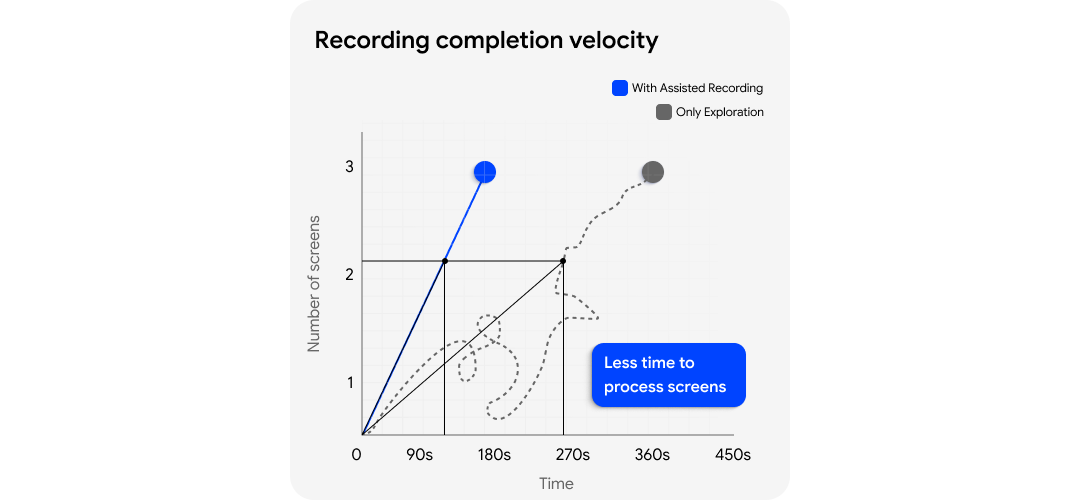
Velo solves this with assisted recording. Instead of giving the system a one-line prompt, the user records a rough take directly on the Velo platform. They walk through the product, speak their intent out loud, and show the agent what needs to be demonstrated. That recording becomes the instruction layer for Velo.
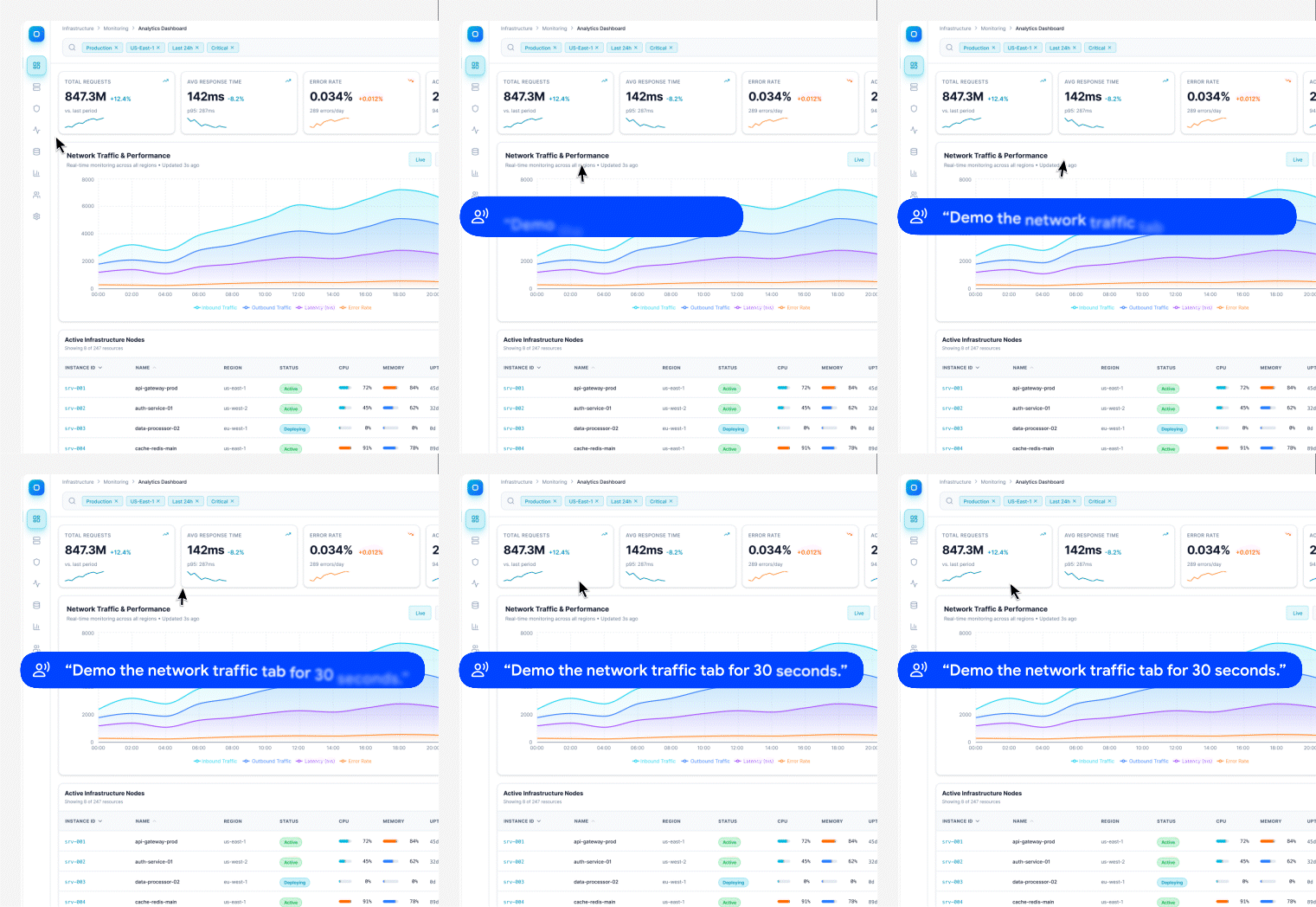
From that assisted recording, Velo captures three aligned artefacts: screen video, user audio, and session replay. This is not a convenience feature. It is the input that anchors the browser agent.
Instead of guessing what matters on a page, the agent starts from a demonstrated path, an intent, and a replay trace of how the product was actually used. This acts as a grounding layer for the agent, turning ambiguous exploration into guided, reproducible execution.
The Script writer and the Cameraman
The script writer understands the story you’re trying to tell, and the cameraman executes it precisely inside a live browser. This separation is intentional. Generating a clear narrative and reliably reproducing product interactions are fundamentally different problems, and treating them independently makes the system far more robust.
The multimodal script writer agent consumes the assisted recording and creates a structured, high-quality script that is later used as narration. It doesn’t just transcribe audio, it interprets intent from screen activity, user audio, and interaction flow.
The result is a clean, step-by-step narrative that removes hesitation, filler words, and rough edges from the original recording. At the same time, the agent generates exact and precise execution steps for the browser agent to follow, turning a rough walkthrough into a deterministic plan.
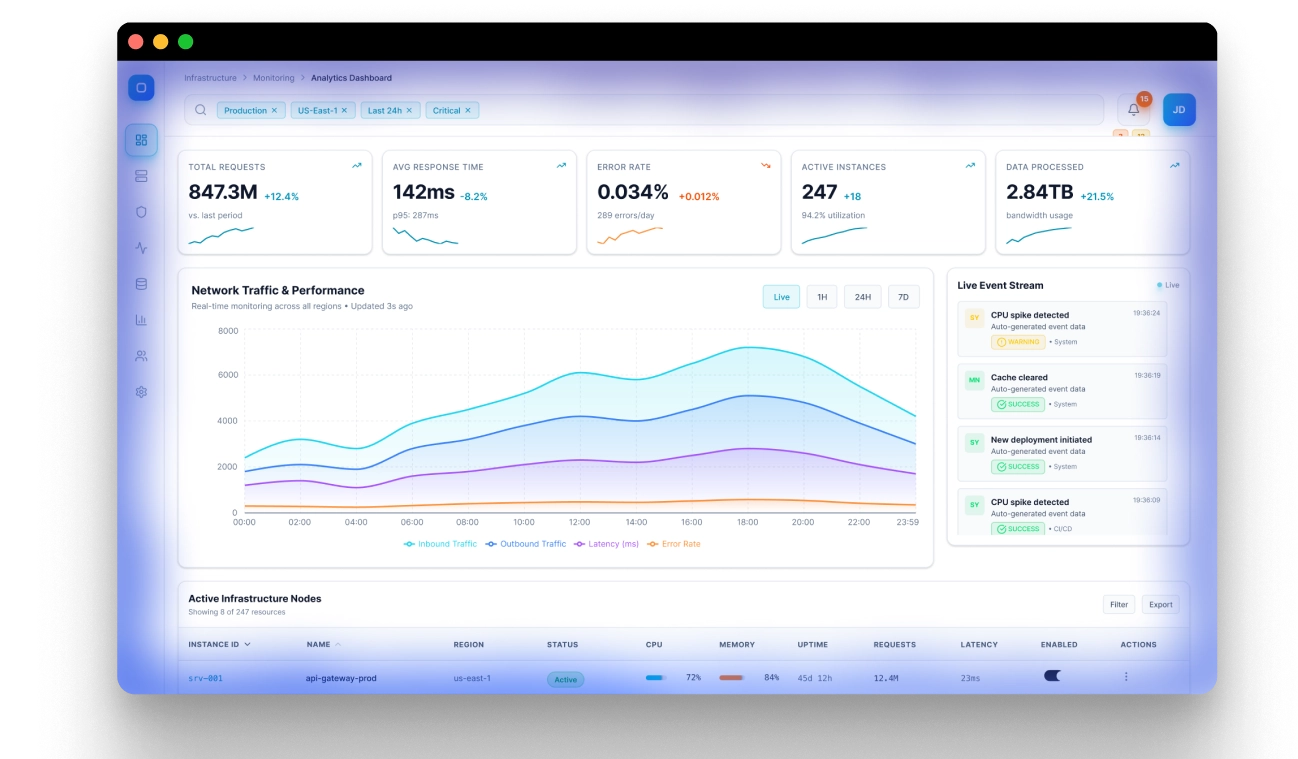
The cameraman then runs as an event-driven execution loop. It starts from a target URL, establishes a live browser connection, starts recording, and continuously observes accessibility signals, and the DOM to infer meaningful events. Those events are checked against the current scene objective defined by the script. If the objective is incomplete, the loop continues. If the objective is satisfied, Velo stops recording and emits two artefacts: the raw video and the event locations that later drive scene segmentation and effect placement.
How we achieved audio-video synchronisation
Velo aligns audio with video after execution, but using a structure defined before execution. Once the cameraman agent finishes recording, its action trace is segmented into scenes based on the objectives generated by the script writer. This ensures that the final video follows the intended narrative structure rather than raw execution order.
Audio is then generated independently for each scene. During this step, non-essential actions such as idle waits, loading gaps, and internal agent state updates are filtered out, ensuring that narration focuses only on meaningful product interactions. The generated audio is then mapped back to the corresponding visual segments.
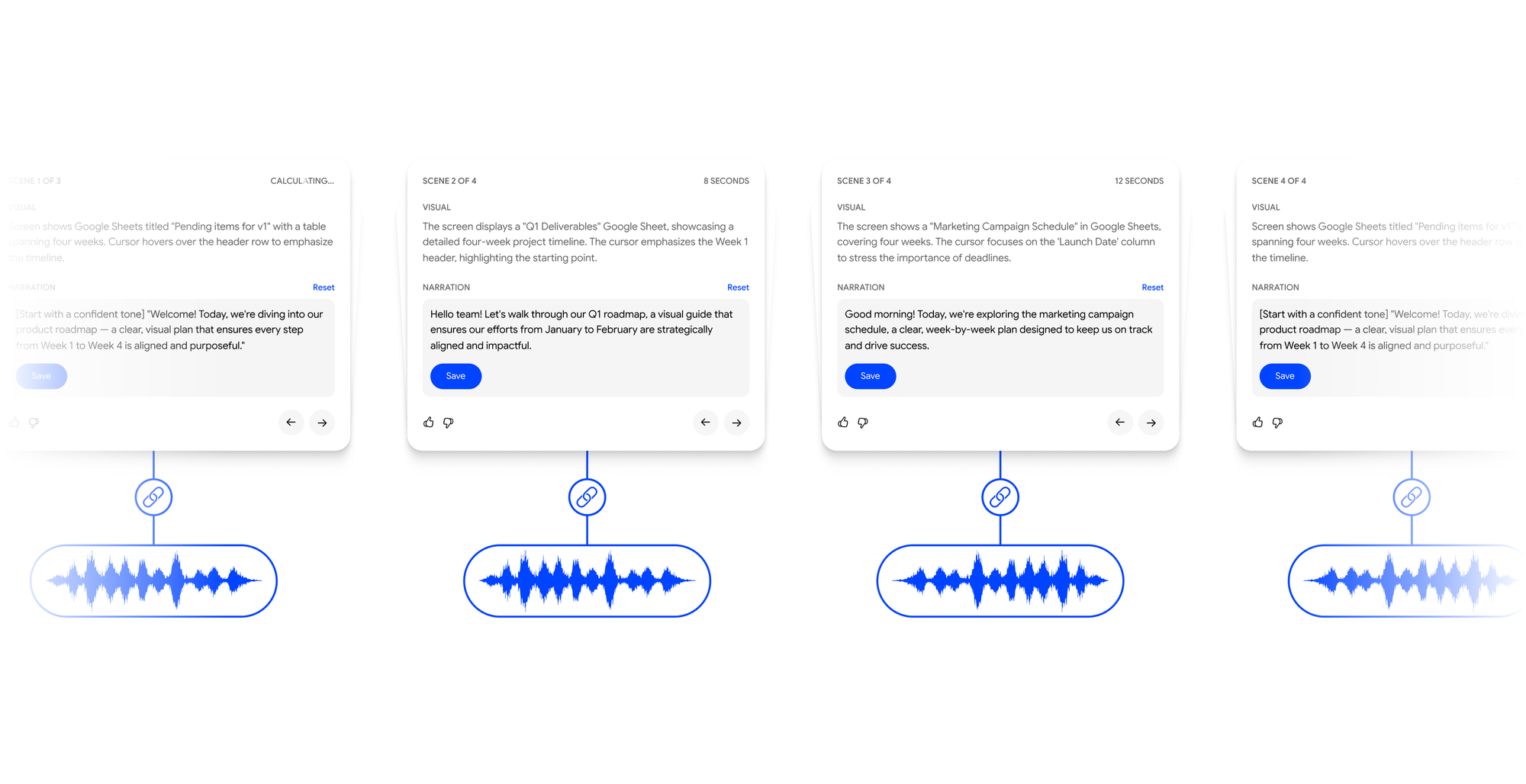
For each scene, Velo compares audio duration with video duration and reconciles any mismatch. This may involve trimming dead time, extending visual holds, or retiming playback to maintain natural pacing. The goal is to produce narration that feels intentional and tightly synchronised with the visuals.
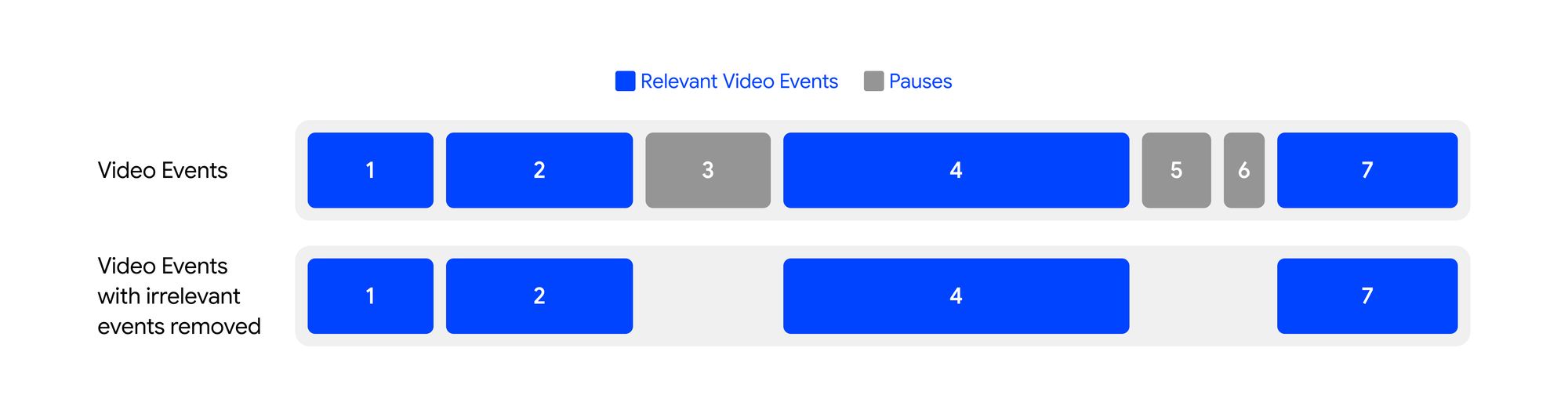
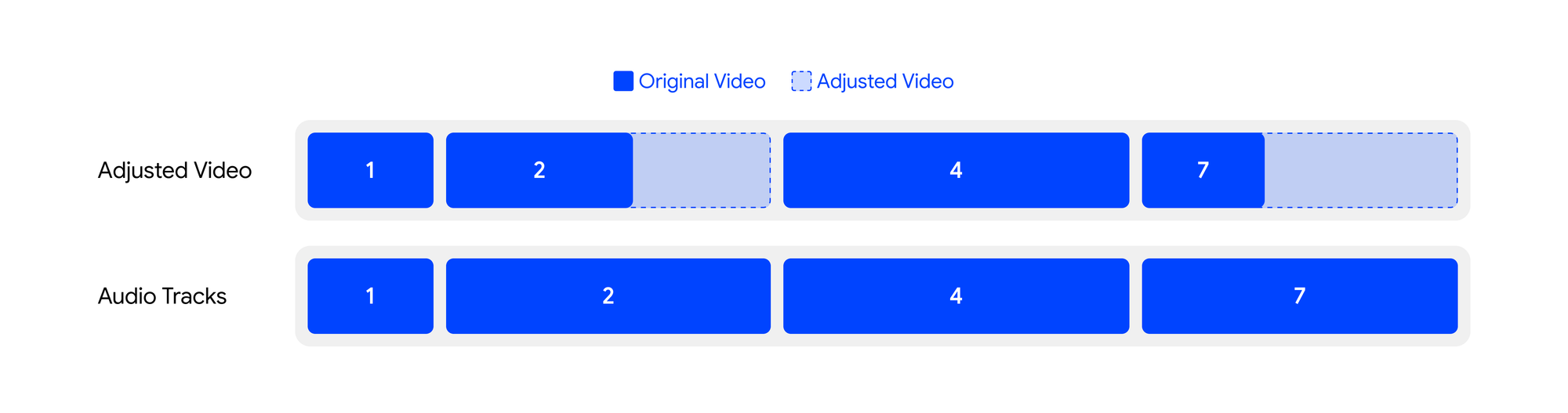
Once alignment is complete, the scenes are stitched together using FFmpeg and passed into the post-processing pipeline for transitions, effects, and final rendering.
What’s happening under the hood ?
Under the hood, Velo converts the product surface into a machine-understandable state built from the URL, DOM, screenshots, session replay, network activity, and accessibility signals. We do this because raw HTML is too noisy, screenshots are too implicit, and modern interfaces are too dynamic for selector-based automation to hold up on their own.
The agent needs a structured model of what is visible, what is actionable, what is stable, and what just changed. Simplified for readability, it looks something like this; the production state includes additional visual, temporal, and network signals.
AgentPageState {
  route: "/dashboard/analytics",
  page_type: "analytics_view",
  visible_elements: [
    { id: "analytics_tab", role: "tab", label: "Analytics", actionable: true, stable: true },
    { id: "funnel_chart", role: "chart", label: "Activation Funnel", actionable: false, stable: true },
    { id: "date_filter", role: "button", label: "Last 30 days", actionable: true, stable: true }
  ],
  focus_regions: ["sidebar_nav", "chart_panel"],
  loading_state: "settling",
  recent_transition: {
    trigger: "click(analytics_tab)",
    changed_regions: ["chart_panel", "filter_bar"]
  },
  replay_context: {
    proven_path: ["sidebar.analytics", "date_filter.last_30_days"],
    narration_anchor: "drill into analytics to surface the signals that matter"
  },
  screenshot: {
    screenshot_1: "screenshot.png"
  }
}
That state model is the bigger breakthrough. It gives the browser agent something better than a DOM tree and something more useful than a screenshot: a page representation optimised for action selection, narration planning, and recording quality.
Velo, does not treat video generation as a loose combination of capture, voiceover, and editing. Each recording is represented as a structured timeline where narration, timing, cursor motion, zoom placement, and UI actions are planned together.
[
  {
    "time": "00:00.00",
    "duration_in_seconds": 4.2,
    "script": "We start on the dashboard, where the user gets an immediate view of system activity.",
    "video_action_plan": {
      "page_state": "dashboard_loaded",
      "cursor": "move_to(metrics_panel)",
      "zoom": "focus(metrics_panel, 1.15x)",
      "interaction": "hover(metrics_panel)"
    }
  },
  {
    "time": "00:04.20",
    "duration_in_seconds": 5.1,
    "script": "From here, Velo drills into analytics to surface the signals that matter.",
    "video_action_plan": {
      "page_state": "analytics_tab_visible",
      "cursor": "move_to(analytics_tab)",
      "zoom": "focus(tab_header, 1.10x)",
      "interaction": "click(analytics_tab)"
    }
  }
]
That shared timeline gives the browser agent, renderer, and audio pipeline one execution model instead of three disconnected systems trying to stay in sync.
Least-Time, Least-Token Wastage
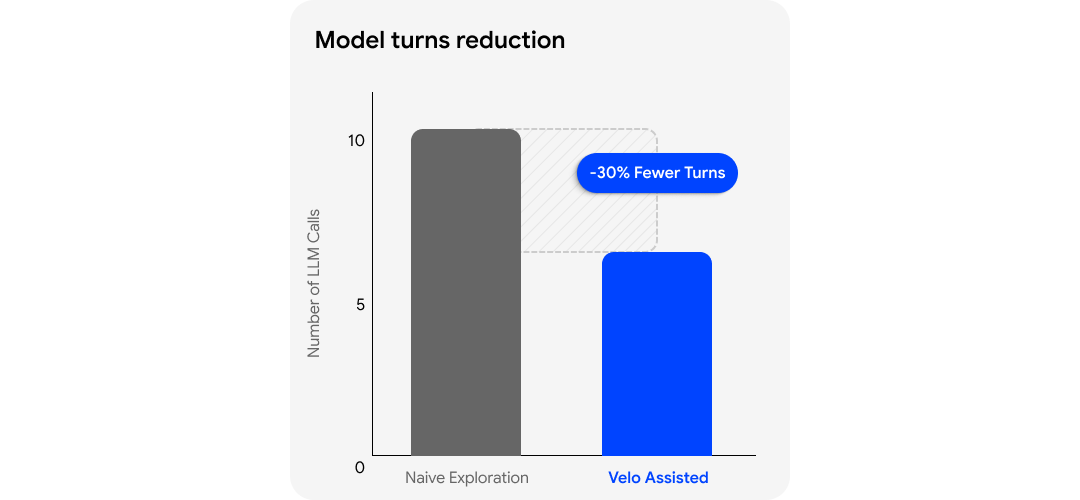
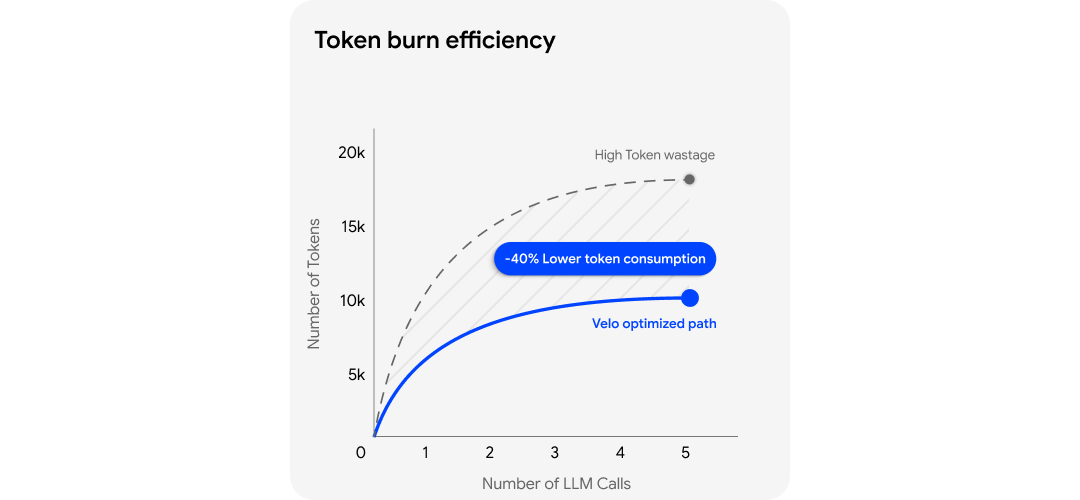
This is the optimisation that matters most in practice. In modern products, an element existing in the DOM does not mean the page is ready. Acting too early creates retries. Retrying creates more model turns. More model turns mean more latency and more token burn.
Velo watches request timing, route transitions, and page-settling behaviour to choose the least-time, least-token path for navigation and action execution. Session replay strengthens this further by giving the agent a proven route instead of forcing it to rediscover the flow from scratch.
The result is not just better navigation. It is faster, economical and more precise navigation.
How others are solving browser agent screen recording
When we looked at tools adjacent to Velo, we came across agent-video, an MCP server built by MUX.
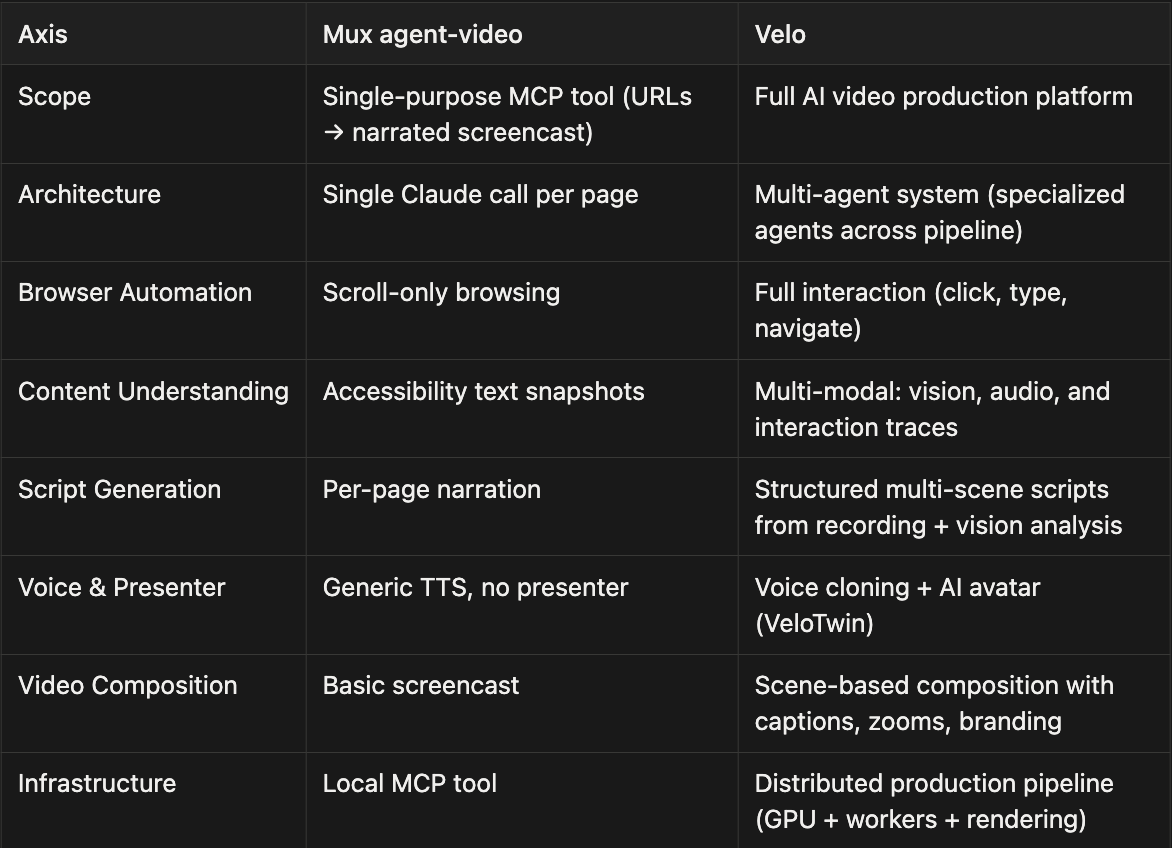
It is a useful developer tool, and it shows a coding agent like: Claude Code, Codex, or even OpenClaw can turn a URL into a narrated screencast. But that is still a long way from production-grade video generation that we do at Velo.
Velo is not trying to solve URL-to-video as a narrow automation task. It is building the full production stack for product videos: browser interaction, multimodal understanding, structured scripting, audio-video synchronisation, effects, avatars, branding, and human-in-the-loop editing.
Let’s compare by evaluating both MUX’s agent-video and velo. We gave both Velo and MUX a simple task:
Visit the gemini app at https://gemini.google.com/ and Generate an image of Sharukh Khan in Runway Style
MUX Video Output
MUX video Output
Velo Video Output
Velo video output
Here is a breakdown of how both Velo and MUX approached the task:
- Velo's Agent: It successfully navigated to the Gemini app, opened the "Tools" menu, and selected the "Create image" option. It then seamlessly entered the prompt and generated the requested image of Shahrukh Khan.
- MUX's Agent: MUX successfully reached the Gemini app URL. However, rather than locating the specific image generation tool, it pivoted to providing a general, guided overview of the screen's layout and available features.
Here are some key differences:
What's next - Velo roadmap
The next quarter is where this gets more interesting. Now we want to remove the remaining boundaries between exploration, planning, and post-production.
- Computer-use agent: Today, assisted recording gives the browser agent a rough take, a replay trace, and clear user intent. The next step is a computer-use agent that can explore, interact, and record on it’s own, in the user’s PC.
The computer-use agent would not only make demo videos of browser based sites, but also create videos for any application on the user’s PC. The goal is not autonomous browsing for its own sake. The goal is to reduce setup time without falling back to brute-force exploration.
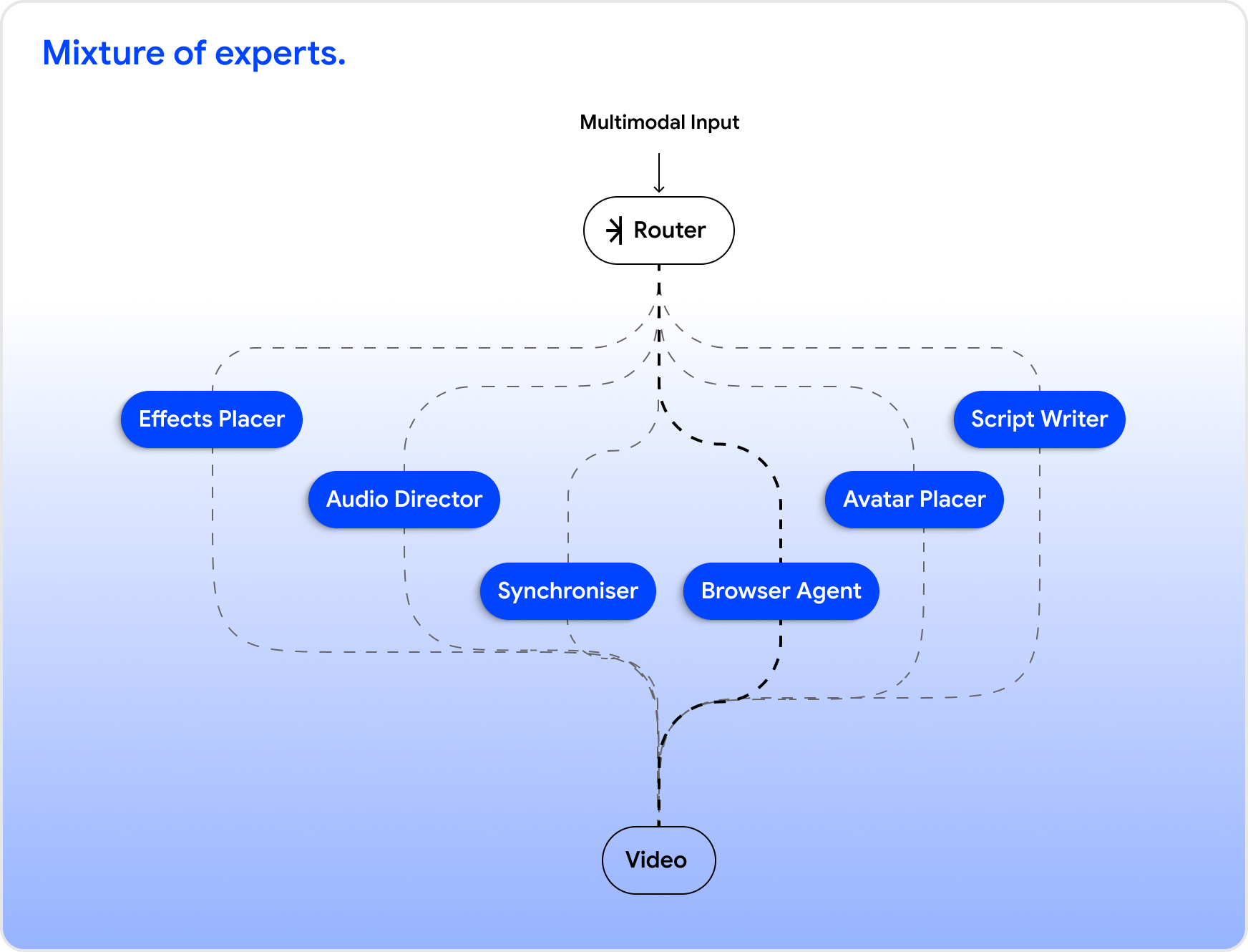
- A shared-context model for the screen recording crew: Today, Velo’s production crew is made up of specialised systems that work asynchronously: the script writer, browser agent, audio director, effects placer, and synchroniser. That modularity helped us ship fast, but it also creates coordination boundaries.
We want these systems to share memory, intermediate state, and intent instead of passing context through narrow handoffs. The long-term direction is a single end-to-end mixture-of-experts model that can reason across the entire pipeline while still preserving specialist behaviour where it matters.
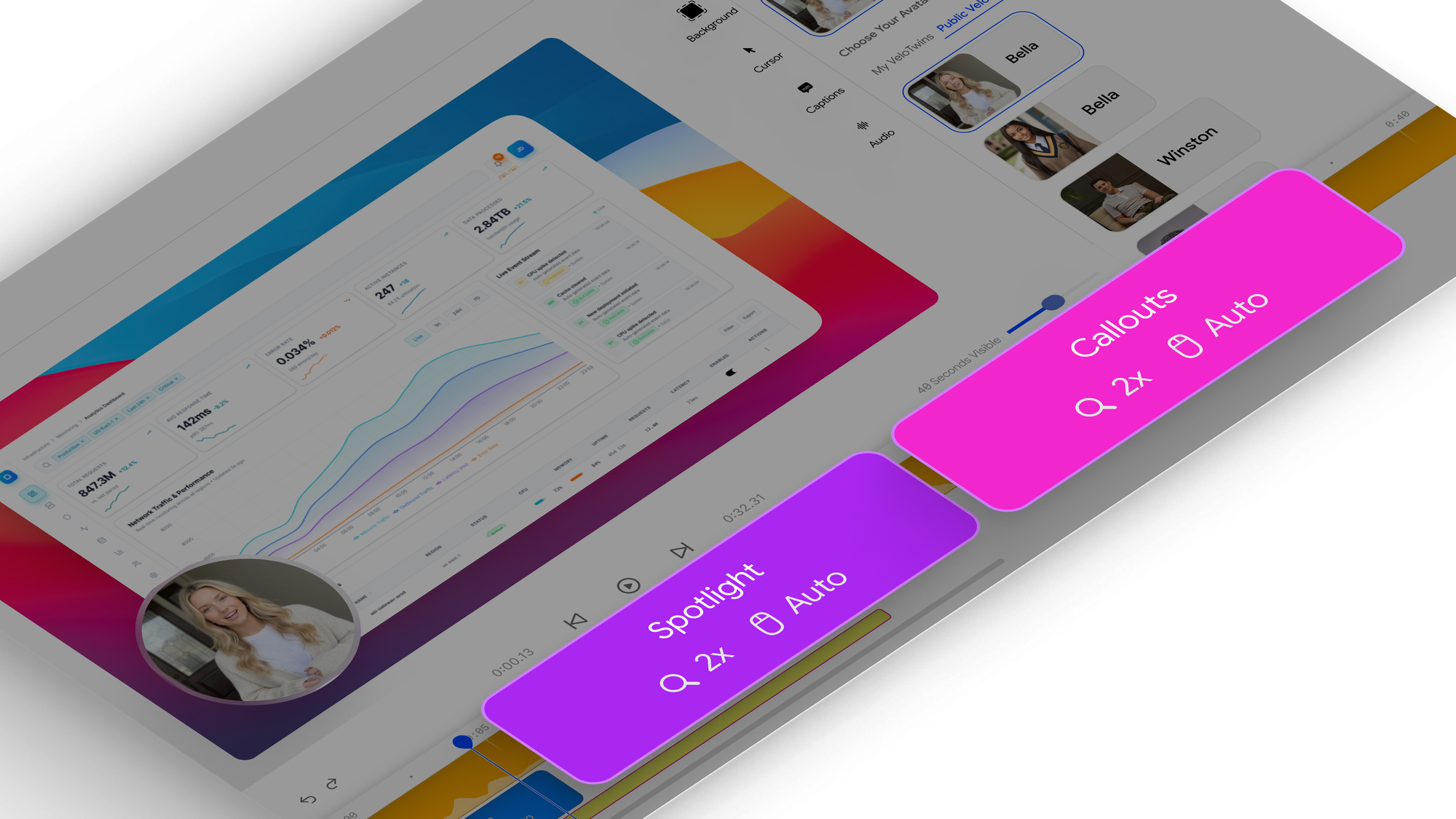
- More automated effects: Cursor trajectories and zoom placement are already automated in the creation flow. However, callouts and spotlights are still manually placed. We have a plan to change the manual placement of these effects in upcoming version of Velo.
How? We will move more of the effects layer into the same timeline-driven system as zooms and cursor movements, so scene emphasis is computed from narration timing, interaction targets, and visual salience rather than added manually in post.
Summary
So far, we talked about how Velo approaches AI video generation as a systems problem rather than a single-model problem.
We covered:
- how assisted recording grounds agent behaviour,
- how the script writer and cameraman agents collaborate to produce structured demos,
- and how Velo aligns narration and visuals through a scene-based architecture.
Moreover, we looked at how this multi-stage pipeline enables reliable, high-quality video generation from real product workflows.
A key theme throughout is specialisation. Instead of relying on a single agent to orchestrate everything — understanding intent, navigating the product, writing scripts, recording video, and editing.
Velo decomposes the problem into specialised agents. Each agent is optimised for a specific responsibility: interpreting intent, executing interactions, segmenting scenes, generating narration, and post-processing video.
This modular approach improves reliability, makes failures easier to isolate, and allows each component to evolve independently. In practice, this leads to more deterministic execution and higher-quality outputs than a monolithic agent trying to do everything at once.
Another important aspect is that Velo improves over time. As the browser agent navigates products and generates a demo, it continuously consolidates interaction patterns, UI structures, and workflow knowledge into an evolving knowledge base. This allows future executions to become more stable, faster, and context-aware. Over time, Velo doesn’t just generate videos, it builds product understanding.
Agentic screen recording is still early, but the direction is clear. Moving from pixel capture to intent capture, from single agents to specialised systems, and from one-off recordings to accumulating product knowledge. Velo is designed around that future - where creating product videos becomes a natural by-product of building and shipping software.
A sincere thank you to Fal and ElevenLabs for supporting Velo with credits while we built the system. Products like this are costly to prototype, and their support helped us move faster, test more aggressively, and push the production stack further and faster.